Mac Media Keys is a macOS menu bar app to make the media keys on my keyboard (play/pause, next, previous) do what I expect instead of targeting arbitrary*I know it's not arbitrary but it is a principle of least surprise violation. media--or worse--launching Apple Music*[stab! stab! stab!].
I want to always target the particular music streaming app I'm using.
I was happy using Mac Media Key Forwarder for years but it stopped working and I couldn't find a replacement*The others I found either didn't work or tried to do too much. so I decided to try to make one.
I find macOS's media key handling behavior mildly infuriating. When I hit play/pause on my keyboard I just want it to toggle playback in whatever music streaming app I'm listening to. I never want it to launch Apple Music*macOS routes media key presses to Apple Music by default if it can't find a suitable target and there's no way to change this infuriating behavior.. I never want it to pause the video I'm watching. Just pause or resume music. That's it. Nothing else.
But that's not what happens, and while I understand why it does what it does, I'm frequently surprised and annoyed by it. So that's what this app tries to fix: Binding the play/pause and previous/next keys to a specific app of your choosing.
I did this for myself because it makes me irrationally angry when Apple Music launches unexpectedly. It hadn't even ocurred to me to publish it until my lovely ladyfriend suggested it. But I would beam with pride if you used it and liked it.
If you wanted to buy me a coffee that would be cool too.
Pick your music app and all media keys go there. Always. No exceptions.
Intercepts media key events before macOS can route them to Apple Music or any other unintended app.
First-class support for the two most popular players, with native AppleScript integration.
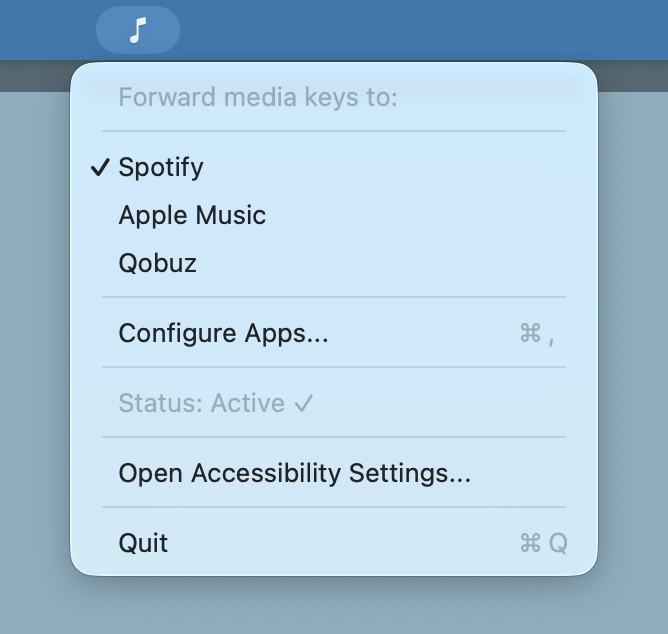
Add any media app through the Configure Apps panel. If it plays music, you can control it.
A tiny music note icon. Click to switch apps. Stays out of your way otherwise.
Your selected app persists between launches. Set it once and forget about it.
Grab the latest release, unzip, and drag to Applications.
Click the music note in the menu bar and select your preferred music player.
That's it. Your media keys now go where they should.
Mac Media Keys Forwarder isn't on the Mac App Store because it needs Accessibility permissions that sandboxed App Store apps can't request. The app is signed and notarized by Apple, so it will open without any Gatekeeper warnings. You'll just need to grant Accessibility permission in System Settings, which the app will prompt you for.
Mac Media Keys Forwarder is free and open source. If it saves you from even one unwanted Apple Music launch, consider buying me a coffee.
Buy Me a Coffee